DJ TechTools
  • Blog
    • DJ Gear
      • DIY Projects
      • Gear Reviews
      • New Products
      • Controllerism
    • Techniques + Tips
      • Beginner DJ
      • Advanced DJ
      • Producer
      • Finger Drummer
    • News + Culture
      • Editorials + Opinions
      • Artist Interviews
      • Performances + Routines
      • How I Play
    • DJ Software Tutorials
      • Serato Tips
        • Traktor Tips
      • CDJ Tips
      • Ableton Live Tips
  • Store
    • Run by real DJs, not a corporation
    • DJ Controllers
      • Midi Fighter Twister
      • Midi Fighter Spectra
      • Midi Fighter 64
      • View All
    • Accessories
      • Chroma USB Drive for DJs
      • Chroma Caps
      • Chroma Cables Audio
      • Chroma Cables USB-A
      • Chroma Cables: USB-C
      • DJTT Gift Card
      • Midi Fighter T-Shirt
      • Keyboard Covers
      • Earplugs by V-Moda
    • Production Gear
    • Soundcards & Mixers
  • Community
    • Popular Forums
      • General Discussion
      • Buy & Sell
      • Reviews
      • Mixes
      • Music Production
      • Show Your Setup
      • Off Topic
    • Handy Links
      • New Posts
      • Private Messages
      • Register
      • Search
    • Midi Maps
      • Traktor
      • Ableton
      • Serato DJ
      • Midi Fighter 3D
      • Midi Fighter Twister
      • Midi Fighter Spectra
  • Midi Fighter
  • Chroma
No Result
View All Result
DJ TechTools
  • Blog
    • DJ Gear
      • DIY Projects
      • Gear Reviews
      • New Products
      • Controllerism
    • Techniques + Tips
      • Beginner DJ
      • Advanced DJ
      • Producer
      • Finger Drummer
    • News + Culture
      • Editorials + Opinions
      • Artist Interviews
      • Performances + Routines
      • How I Play
    • DJ Software Tutorials
      • Serato Tips
        • Traktor Tips
      • CDJ Tips
      • Ableton Live Tips
  • Store
    • Run by real DJs, not a corporation
    • DJ Controllers
      • Midi Fighter Twister
      • Midi Fighter Spectra
      • Midi Fighter 64
      • View All
    • Accessories
      • Chroma USB Drive for DJs
      • Chroma Caps
      • Chroma Cables Audio
      • Chroma Cables USB-A
      • Chroma Cables: USB-C
      • DJTT Gift Card
      • Midi Fighter T-Shirt
      • Keyboard Covers
      • Earplugs by V-Moda
    • Production Gear
    • Soundcards & Mixers
  • Community
    • Popular Forums
      • General Discussion
      • Buy & Sell
      • Reviews
      • Mixes
      • Music Production
      • Show Your Setup
      • Off Topic
    • Handy Links
      • New Posts
      • Private Messages
      • Register
      • Search
    • Midi Maps
      • Traktor
      • Ableton
      • Serato DJ
      • Midi Fighter 3D
      • Midi Fighter Twister
      • Midi Fighter Spectra
  • Midi Fighter
  • Chroma
No Result
View All Result
DJ TechTools

Flow 8 Deck: Mixed in Key’s 8-Deck DJ Software, Supports Stem Files

Dean Zulueta by Dean Zulueta
September 13, 2015
in Breaking News, DJ Gear Announcements, News, News + Culture
Reading Time: 3 mins read
0
Flow 8 Deck: Mixed in Key’s 8-Deck DJ Software, Supports Stem Files
337
VIEWS
Post on FacebookTweet thisUpvote on Reddit

DJing has advanced from a two deck affair to reasonably incorporating four decks in more advanced sets, but there hasn’t been a DJ software that easily allows DJs to venture beyond “simple” four deck mixing. For the DJs looking to mix on eight decks (with full Stem file support) the time has come with Mixed in Key‘s new DJ software, Flow 8 Deck.

Mixing with 8 Decks

Like the name says, Flow 8 Deck is an innovator in DJ software with its ability to play eight decks of audio simultaneously. This has been possible before in DAW softwares, but this is the first time we are seeing it in a specific DJ deck format. DJs who use Pioneer, Numark, Native Instruments, Akai, and other major controller makers will mostly likely find their 2-deck controllers supported natively by Flow 8 Deck. The DDJ-SB, the Kontrol S2, Mixtrack Pro and many more are all supported.
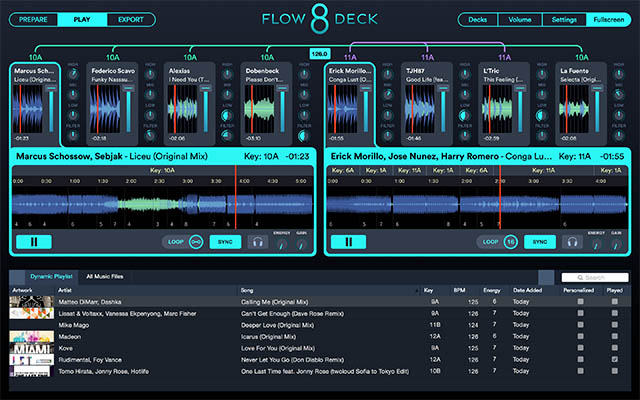
Flow 8 Deck - 8X8

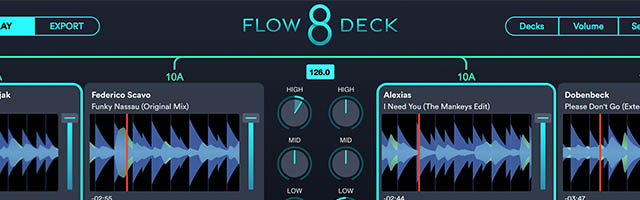
The 8-deck mode on the software puts each deck’s waveform side by side on the left and right sides of the mixer; a total of four decks per side. The active track is then shown in more detail below the tracks on the respective sides of the controller. For having that many decks, it sounds really busy – yet Mixed in Key found a clean way to layout all the necessary controls a DJ needs to see to control 8 decks. Next to each deck is an EQ, Filter, and a pitch fader nuzzled up next to the waveform.

Stem File Support, Dimensional Mixing, Retina Support

There has also been a lot of talk about Stem files, and while most DJs will use Traktor to control them, Flow has the ability to play back these files as well. Interestingly enough, Flow is also more than able to display up to eight waveforms of Stem playback – something that Traktor is struggling with while they figure out CPU/GPU issues. Mixed in Key took the dedicated Stem controllers out of the equation by giving DJs the ability to control Stems, using the EQ knobs for the volume of each Stem. The High knob controls Vocal stem, the Mid knob controls the Melody stem, and so on.

On top of Stem support Flow 8 Deck also has a new way to mix called Dimensional Mixing. Sometimes, a DJ wants to chop up a track or skip to the last breakdown, but without any preparation. Dimensional Mixing allows a DJ to click anywhere on the audio waveform of a track and cross-fade to that point. Cut the song short or chop up a breakdown simply by clicking around on the waveform. A new spin on beat jumping that adds more fluidity.
Flow Lines

Mixed in Key has also included retina support for every screen in the software; each screen looks is sharp and clear. There’s also clear indicator lines – “Visual Flow Lines” – which show the decks that are playing in key, as well as a minimalist design that combines color along with motion to indicate important information.

Dynamic Playlists
Flow Playlists

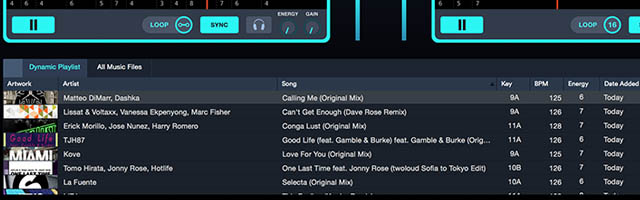
A final notable feature in Flow 8 Deck is its integration with the Mixed in Key algorithms. Mixed in Key has been working on its key detection software for years, and the software brings in that knowledge with “Dynamic Playlists” – which automatically can bring up tracks that work well together based on their key, energy, and tempo.

As more companies develop DJ software there may be a pilgrimage to new styles of mixing. Flow 8 Deck is definitely for those seeking more decks to play and it is an interesting piece of DJ software that deserves to be put to the test by DJs all across the world. The software is only available for Apple DJs however a Windows version is on the way.
Flow 8 Deck is currently available for Mac OSX 10.9+ for $58 and it is free for current Flow DJ software users.

Tags: 2 decks4 decks8 deck mixing8 decksControllerismddj-sbdeckdj softwaeDj softwareDynamic PlaylistsflowFlow 8 DeckFlow DJInnovatingkontrol s2Mac DJ softwareMacbook Pro Retina displaymixed in keyMixtrackNative InstrumentsNew DJ software 2015numarkpioneepioneerRetinastemsVisual Flow
Share3Tweet2Share
Previous Post

Blond:ish On Preparing DJ Sets with Beatport Pro

Next Post

Maschine Integration in Traktor Pro 3.0: 12 Features We Want To See

Related Posts

Engine DJ 5.0: on-board stems on the System 1, RGB waveforms for everyone
Breaking News

Engine DJ 5.0: on-board stems on the System 1, RGB waveforms for everyone

May 13, 2026
A Prime 4+ and a Kontrol S3 intercut against eachother over a black background
Breaking News

InMusic just bought Native Instruments. So what now for Traktor?

May 8, 2026
The DJM-V5 from AlphaTheta: 3 channels, 4-band EQ, V10 sound – no Beat FX or crossfader.
Breaking News

The DJM-V5 from AlphaTheta: 3 channels, 4-band EQ, V10 sound – no Beat FX or crossfader.

January 20, 2026
Load More
Next Post
Maschine Integration in Traktor Pro 3.0: 12 Features We Want To See

Maschine Integration in Traktor Pro 3.0: 12 Features We Want To See

Want to reach DJTT's audience here?

Shoot an email to advertising@djtechtools.com

DJTT ads
DJTT newsletter
Midi Fighter
Chat with us
  • ABOUT DJTT
  • CONTACT
  • PRIVACY
  • MIDI FIGHTER HELP
  • ABOUT DJTT
  • JOBS
  • CONTACT US
  • ADVERTISE
  • PRIVACY POLICY
  • ACCESSIBILITY STATEMENT

© 2024 DJ Techtools all rights reserved by DJ TechTools on all content unless otherwise noted.

No Result
View All Result
  • Blog
    • DJ Gear
      • DIY Projects
      • Gear Reviews
      • New Products
      • Controllerism
    • Techniques + Tips
      • Beginner DJ
      • Advanced DJ
      • Producer
      • Finger Drummer
    • News + Culture
      • Editorials + Opinions
      • Artist Interviews
      • Performances + Routines
      • How I Play
    • DJ Software Tutorials
      • Serato Tips
      • CDJ Tips
      • Ableton Live Tips
  • Store
    • Run by real DJs, not a corporation
    • DJ Controllers
      • Midi Fighter Twister
      • Midi Fighter Spectra
      • Midi Fighter 64
      • View All
    • Accessories
      • Chroma USB Drive for DJs
      • Chroma Caps
      • Chroma Cables Audio
      • Chroma Cables USB-A
      • Chroma Cables: USB-C
      • DJTT Gift Card
      • Midi Fighter T-Shirt
      • Keyboard Covers
      • Earplugs by V-Moda
    • Production Gear
    • Soundcards & Mixers
  • Community
    • Popular Forums
      • General Discussion
      • Buy & Sell
      • Reviews
      • Mixes
      • Music Production
      • Show Your Setup
      • Off Topic
    • Handy Links
      • New Posts
      • Private Messages
      • Register
      • Search
    • Midi Maps
      • Traktor
      • Ableton
      • Serato DJ
      • Midi Fighter 3D
      • Midi Fighter Twister
      • Midi Fighter Spectra
  • Midi Fighter
  • Chroma

© 2024 DJ Techtools all rights reserved by DJ TechTools on all content unless otherwise noted.

This website uses cookies. By continuing to use this website you are giving consent to cookies being used. Visit our Privacy and Cookie Policy.